
If you’re a staff member and would like to order through Flexischools, you’ll need to add yourself as a student on your Flexischools account.
Don’t worry, even though you’re adding a student profile, you will able to access staff ordering via the year and class selection.
Before you start
Before adding your profile:
- Log in to your Flexischools account, or create an account if you don’t already have one.
- Check which year level and class your school or canteen uses for staff orders.
Staff ordering options can differ between schools. For example, some schools may have a separate Staff year level and class such as Staff Room, while others may ask staff to select the year level and class that they teach.
Flexischools App (also applicable to CDFpay app)
- To add a staff profile select the Profile icon from the bottom navigation bar.
.png?width=400&height=810&name=Untitled%20design%20(33).png)
- Select Add New.
.png?width=400&height=810&name=Untitled%20design%20(56).png)
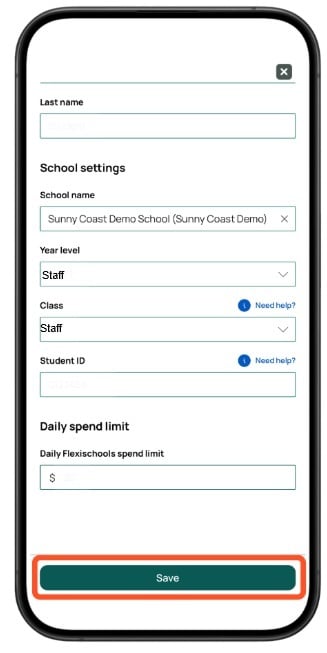
- Fill out the profile details;
- Enter your own first name and surname.
- Search for and select your school.
- Select the staff year level set up for your school.
- Select the staff class advised by your school or canteen..png?width=400&height=810&name=Untitled%20design%20(65).png)
- Once all details have been correctly entered, click select the green 'Save' button at the bottom of the page.
Flexischools Website (Desktop Site)
- Select the 'Students' tab on the left side of the home screen.
.png?width=670&height=670&name=Untitled%20design%20(61).png)
- Click 'Add a student' from the drop-down.
.png?width=670&height=670&name=Untitled%20design%20(62).png)
- Enter your details. Search for your school and select the relevant staff year level and class as advised by your school/canteen.
.png?width=670&height=669&name=Untitled%20design%20(64).png)
- Once all details have been correctly entered, click select the green 'Submit' button on the bottom-right.
.png?width=670&height=670&name=Untitled%20design%20(63).png)
Place an Order
Once you've created your profile:
- Click the 'Order Food' button at the top of the home page.
- Under students, select the profile you created for yourself
- Choose the service (lunch/recess), and date you would like to place the order for.
- Add items to your order
- Click 'Checkout & Pay' when you're done.
Frequently asked questions
-
Why do I need to add myself under Students?
Flexischools uses the profiles to ensure orders are allocated and provided to the correct person. Staff can add themselves as a student, allowing the canteen to identify their order. -
I already have a Flexischools account for my children. Do I need to create another account?
No. You can add yourself to your existing account as an additional profile.
When ordering, make sure you select your own staff profile rather than one of your children’s profiles. -
I can’t see a staff year level or class. What should I do?
Not every school will use a dedicated Staff year level or class.Check with your school or canteen to confirm which year level and class you should use for staff ordering.
Need more help?
If you need help creating your staff profile or updating your details, contact Flexischools Support by submitting a support request here or by calling our dedicated support line on 1300 361 769.