
You can create and edit menu categories within your Supplier Portal.
Accessing your menu
1. Log in to your Supplier Portal.
2. Click Items from the navigation menu.
3. Select the relevant service category.
How to add a new category
1. Click 'Add Category'.
.png?width=670&height=337&name=Supplier%20Portal%20Screenshots%20(8).png)
2. Enter a Category Name and Description.
3. Click 'Create'.
.png?width=475&height=320&name=Supplier%20Portal%20Screenshots%20(9).png)
How to Create and Edit Menu Items
1. To add in items under your new category please refer to the below article:
How to create and edit menu items
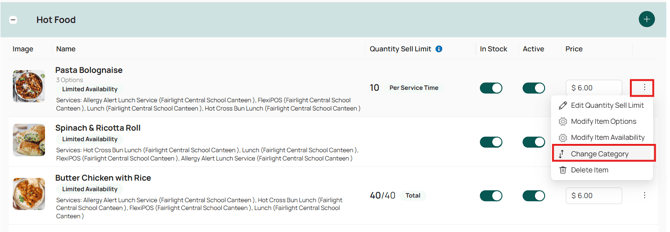
If you need to move an item from one category to another:
- Locate the item within your menu.
- Click the three dots next to the item.
- Select Change Category.
- Choose the category you would like to move the item to and save your changes.
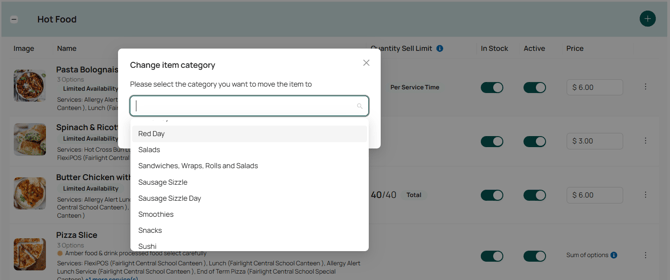
The item will then be moved to the selected category.