
Below is a summary of the reports currently available within the Supplier Portal, along with what they include and how they may be able to help you.
This guide covers daily production reports available in the Label Printing section of the Supplier Portal. For information on other reports that provide business insights and support day-to-day order and stock management, click here.
Printing order reports
- Click on the 'Reports' button on the Label Printing page.
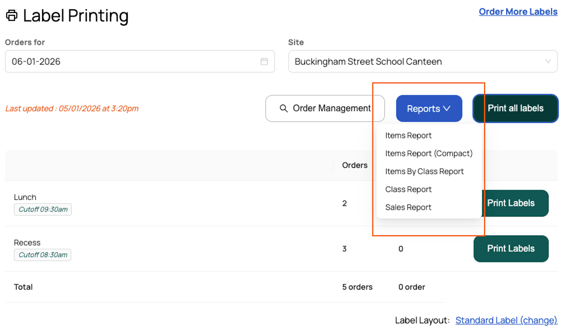
- Select the report you want to print:
Report name What you'll find in this report Use this report for Items Report Items (and options) ordered split by your services, and if applicable, your sites and production areas.
Food production.
To see the quantity of a particular item ordered, including a breakdown of item options.
Items by Report (compact)
The same as the items report, but without page breaks to minimise pages. Items by Class Report Items (and options) ordered split by your services, and if applicable, your sites - grouped by class. Packing and delivery of orders.
This report shows the items that need to be delivered to each class.
Class Report Orders placed split by class, services, and if applicable, site. This report includes the label number, order ID, customer name and order details. Distribution / delivery of orders - split by service.
Sales Report The total number of orders and sales for the day, split by services, and if applicable, your sites. To view and report on sales for the day. - You will be directed to a preview page. Click the blue 'Print (A4)' button.
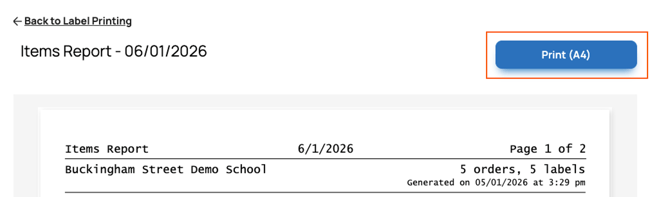
- The print preview screen will appear. Ensure your A4 printer (not your label printer) is selected as the printer destination, then click 'Print'.