
In the Supplier Portal you can find a number of reports to gain insights on your business performance and also for day to day management of your orders and stock.
To view our guide on daily order reports for food production, please click here:
Where are reports located?
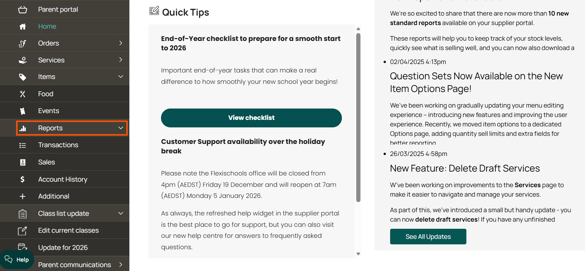
You will find on demand supplier reports in the "Reports" section of the supplier portal accessible via the main menu:
How do I run them?
Once you click on the report you want, wait a moment for the report filter to load on screen. Then select the appropriate filters you would like and click "View Report". Wait while the report loads.
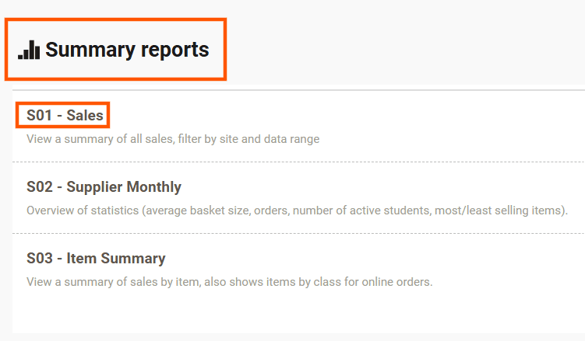
Next click the save icon (looks like a floppy disk) to export your report to Excel - some reports have multiple tabs you will need to download the report to see all your data.
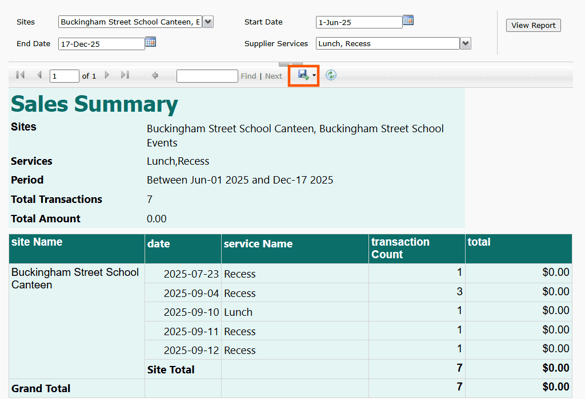
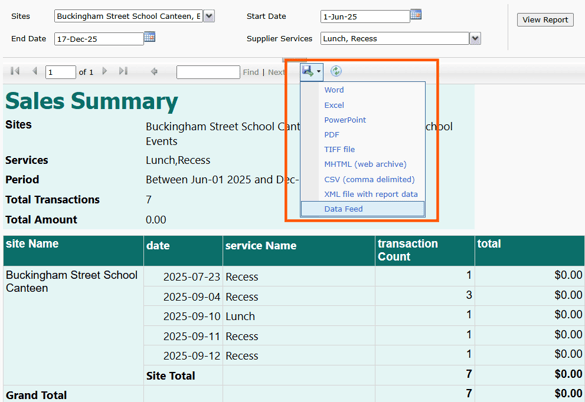
Once downloaded you will find the report in the downloads location on your computer.

What reports are where?
Transactions
Here you will find different reports designed to show orders by date or item. There is also a specific formatted report for items containing question sets.
- The Quantity Sell Limits By Item can be used to track stock and how you have configured your limits.
- The Transaction Summary report will show you all sales across all services (POS and online) together in one report.
- FlexiPOS specific transaction reports are in the section.
Sales
In this section is the summary reports for all sales in a given date period. These reports allow you to track how certain items are selling and average order size.
- Supplier Monthly will show you average basket size, active students and top/bottom selling items
- Item Summary will show you sales by Item including by class
Account History
This is where your supplier statements can be downloaded and shows you all activity in and out of your account
Additional
A few extra reports are located here to help you manage users and items
- Registration will show you a user count by year level
- User Summary will show you all your users and any configured student cards
- All items is a list of all your items on Flexischools which you can use for a printable menu or catalog.